
Signing clients in at your own address
One CNAME record, then the certificate is issued for you.
Go to Agency, then the Domain tab. This is the last place our name is visible to your clients.

Use a subdomain
Enter a subdomain you control, like app.yourdomain.com. A bare root domain is not accepted, because pointing your whole website at a dashboard is almost never what anyone means.
Enter the subdomain and press Connect.
- We register the hostname and hand you one DNS record.
Add that record at your DNS provider.
- Type: CNAME
- Host: the first part of your subdomain, for example
app - Value:
proxy.personify.fyi - There is a Copy record button, so you do not have to retype it.
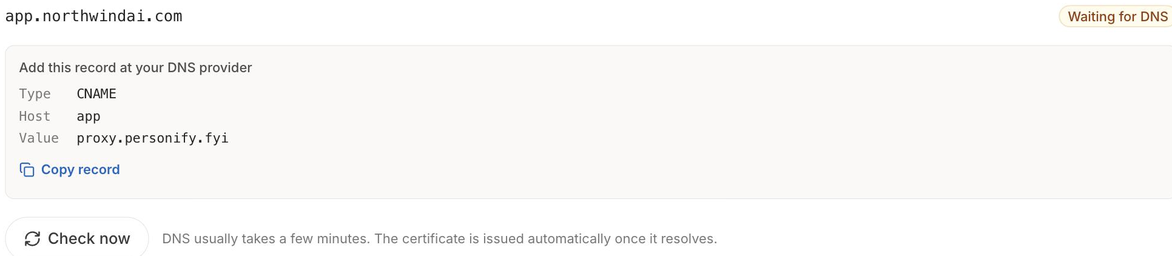
Press Check now.
- DNS usually takes a few minutes. The certificate is issued automatically once the record resolves.
The three states
| Status | What it means |
|---|---|
| Not connected | No domain has been entered yet. Clients sign in at our address. |
| Waiting for DNS | The record is not resolving yet, or the certificate has not been issued. The exact record you need is on screen. |
| Connected | Done. Our name appears nowhere your clients can see. |
If Check now says it could not reach us, nothing has changed. Your domain keeps working exactly as it was. Try again in a minute.
It covers the dashboard, not the public pages
This is the address your clients sign in at. The pages their own audience visits are separate and stay on our share links. Read that again before you promise a client otherwise: it is the single most common thing agencies assume this does.
Without a domain
Everything still works. Your clients sign in at app.personify.fyi, which shows our name in the address bar even though the page itself carries your brand.
A domain already pointed at a single clone page cannot also be used here. Pick another subdomain.