
Putting your name on the dashboard
Name, logo and accent colour, applied to every client at once.
Go to Agency, then the Branding tab. Set a product name, upload a logo, pick an accent colour, then press Save branding.
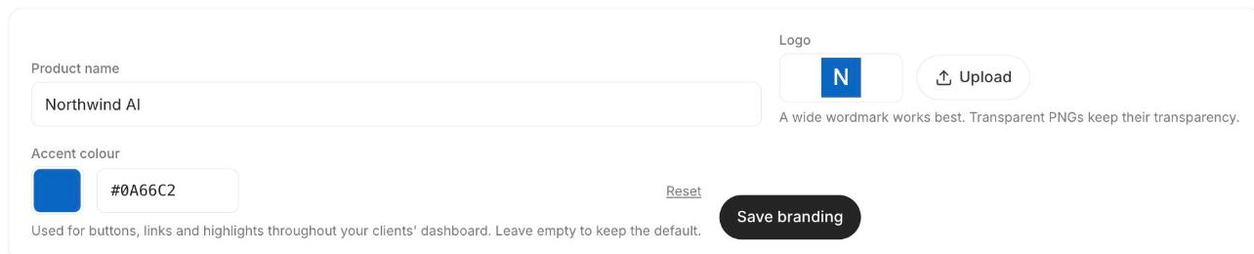
Saving applies it to everyone
Your brand is copied onto every client workspace you manage, not just your own. The button tells you how many it touched. Clients you add afterwards inherit it at the moment they are created, so you do not have to press Save again.
The logo
- A wide wordmark works best. The same image is the masthead of the emails your clients receive, where it renders about 104px across, so a tall or square mark ends up tiny.
- PNG or JPG, under 5MB.
- Transparent PNGs keep their transparency, in the app and in email.
The accent colour
One hex value drives the whole ramp: buttons, links, active navigation, hovers, focus rings and tints are all derived from it. There is nothing else to configure. Leave it empty to keep the default, or press Reset to go back to it.
It also covers the sign-in page, which is the first screen your client ever sees.
This is the difference between a dashboard carrying your name and one that looks like yours. The name and logo sit in the corner; the accent is on every button a client presses.
The accent is the logged-in dashboard only. It never reaches a public clone page, which keeps each coach's own colours. Their visitors should see the coach, not you.
Name it and our logo disappears for good
Once you have set a product name, we never fall back to our own mark. If you save a name without a logo, your name renders as text instead. Our logo sitting above the words "Acme Coaching AI" is worse than no logo at all.
The same rule covers the browser tab. Your product name becomes the tab title, and your logo becomes the favicon. With no logo the tab icon is removed rather than left as ours.
What branding does not reach
- Public clone pages. Those carry each client's own branding, on purpose.
- The address emails are sent from. Only the display name changes. See What your clients see.