
Starter prompts: the questions visitors can tap
Up to four openers that do more for your first message rate than anything else.
Starter prompts are the questions that appear above the chat box, ready to tap. Most visitors click one rather than typing their own, which makes them the highest-leverage copy on your page.
You will find them near the bottom of the Personality step, under Starter Prompts.
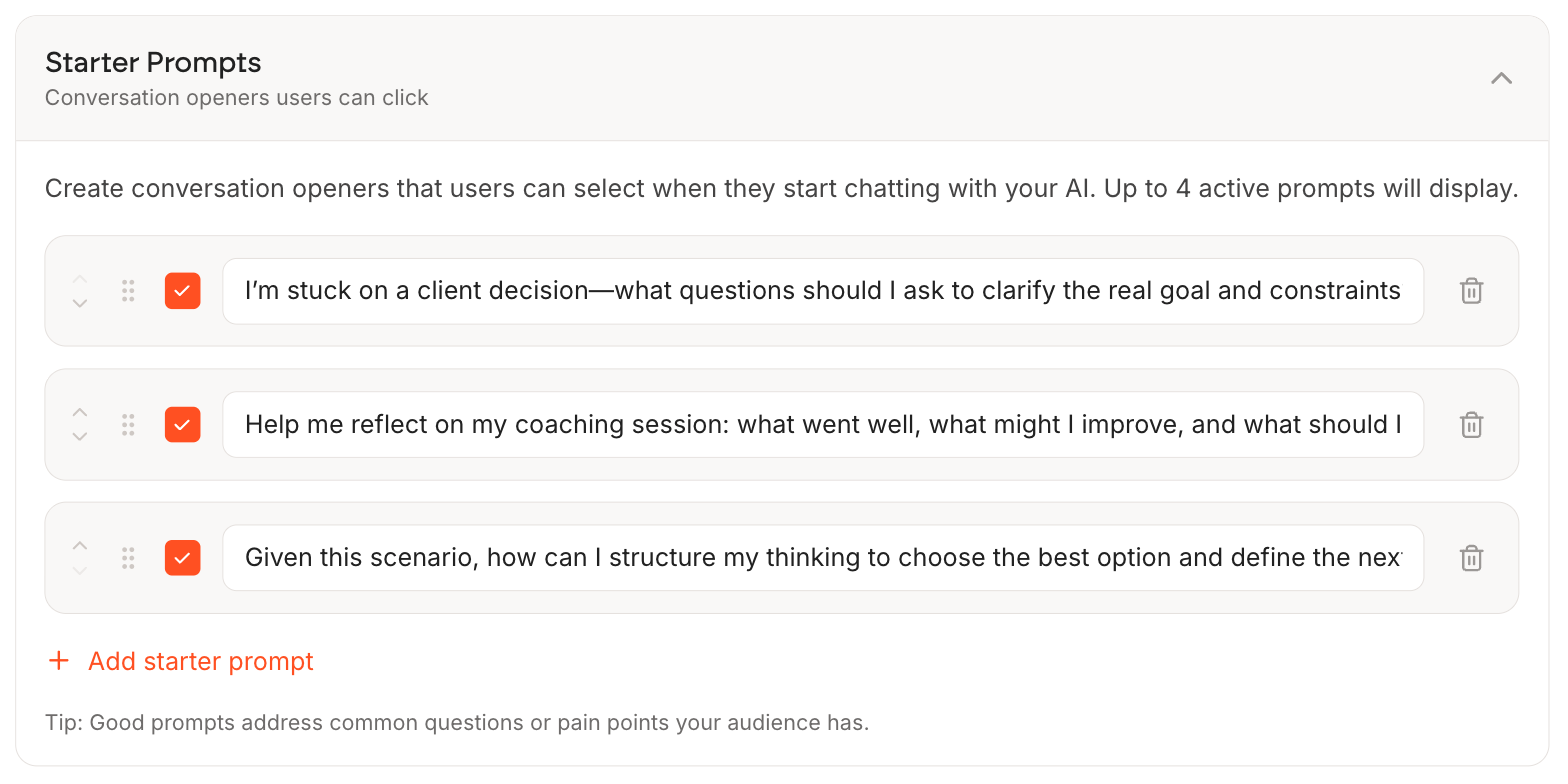
How the list works
- Tick the box to make a prompt live. Up to four active prompts display on your page
- Drag the handle on the left to reorder them
- The bin on the right deletes one
- Untick rather than delete if you want it back later
Writing prompts that get tapped
Write them as your visitor would, in the first person, about their problem. Not about your service.
Gets tapped
- "I am feeling stuck right now"
- "How do I explain a career change without sounding lost?"
- "What should I do first?"
Does not
- "Tell me about your services"
- "What is your coaching philosophy?"
- "Learn more"
The left-hand column names something the visitor is already feeling. The right-hand column asks them to be interested in you, which they are not yet.
Rotating them
Because you can untick without deleting, keep more than four written and swap which are live. Useful for promoting a limited offer, or testing whether a different opener gets more first messages.
Take your four from your Conversations page. The questions real visitors already typed are, by definition, the ones people want to ask.