
Add the chat widget to your site
Build it visually, copy one snippet, paste it once.
Your clone can sit on your own website as a floating chat button, as a section inside a page, or as a full-screen page. You build it visually and Personify gives you a single snippet to paste. There is no code to write.
It is included on every plan, free included.
Where to find it
Open your clone, go to the Deploy step and choose the Your site tab. A live preview on the right shows exactly how it will look on a page.
Pick how it appears
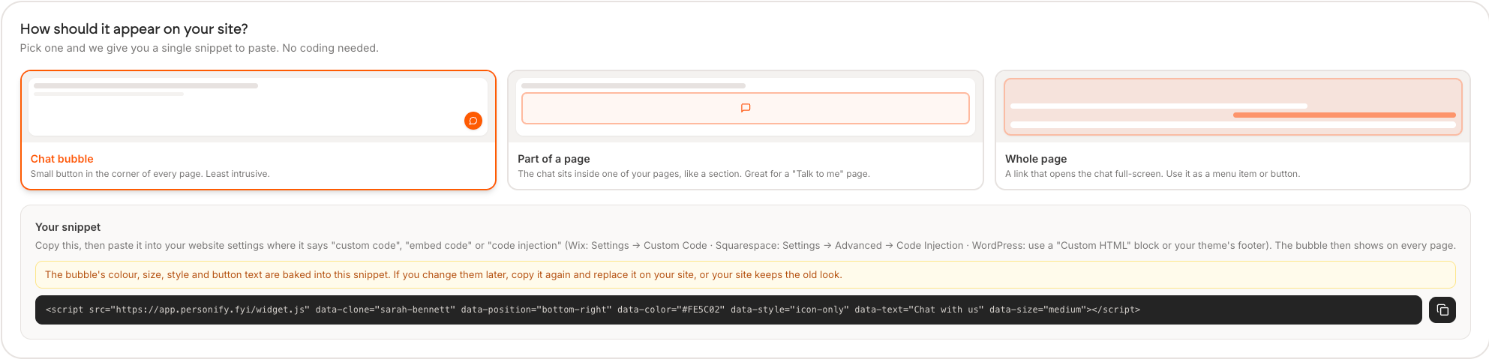
| Option | What it does | Use it for |
|---|---|---|
| Chat bubble | Small button in the corner of every page | Always available, least intrusive |
| Part of a page | The chat sits inside a page as a section | A dedicated "Talk to me" page |
| Whole page | A link that opens the chat full-screen | A menu item or a button |
Paste it into your site
Copy the snippet, then paste it into your website settings wherever it says custom code, embed code, or code injection.
| Platform | Where |
|---|---|
| Wix | Settings, Custom Code |
| Squarespace | Settings, Advanced, Code Injection |
| WordPress | A Custom HTML block, or your theme footer |
| Webflow | Project Settings, Custom Code, Footer Code |
| Shopify | Online Store, Themes, Edit code, theme.liquid |
Pasted into a site-wide setting, the bubble then shows on every page.
Your colour, size, style and button text are baked into the snippet. If you change any of them later, copy the snippet again and replace it on your site, or your site keeps the old look.
Check it worked
Load your site in a private window. The button should appear within a second or two. If it does not, see The widget is not showing up.
Very few people ever complete this step, and it is the one that decides whether your clone gets used at all. A clone on a page people already visit gets conversations. A link you sent once does not. Ten minutes here beats another hour of tuning.