
The Short Answer
You almost certainly do not need to change anything.
languages understood and answered
you can pin explicitly
training pass, whatever the language
Every clone ships with Auto-detect switched on. It reads the language a visitor writes in and answers in that language. No configuration, no separate clone per market, no second upload of your material. A coach in Berlin and a coach in Bogotá can embed the same clone and both get answers their clients can read.
The part people miss
You train it once, in your language. It answers in theirs.
The language setting governs the language of the reply, not the knowledge behind it. Your courses, transcripts and frameworks can be entirely in English and the clone will still answer a question asked in Japanese, in Japanese, from that same English material.
How Auto-Detect Works
Why it is the recommended default, and what it is actually doing.
Auto-detect looks at what the visitor writes and matches it. It happens per conversation rather than per clone, so two people can be talking to the same clone in two languages at the same time and both get a sensible answer.
It is the default because it is nearly always right for the place a clone actually lives. On a public page, a course platform embed or a WhatsApp number, you do not know in advance who is arriving. Pinning a language there means confidently answering a French visitor in English, which is worse than doing nothing.
If you are running localised marketing, this pairs with it directly. Our own site is published in German, Spanish, French and Portuguese, and the clone behind it does not need a separate build for any of them.
When to Pin One Language
Three cases where overriding the default is the right call.
A single-language programme. A cohort run entirely in Spanish, or a German-language course where every participant is a German speaker. Pinning removes the small chance of a reply drifting into another language because someone typed one English sentence.
Material in one language, audience in another. If your source material is English but your clients are Brazilian, pin Portuguese (Brazil) and the clone will consistently translate your approach rather than defaulting to the language it read.
A market-specific deployment. One clone per country, each embedded behind its own landing page or login. Pinning makes each one predictable and easier to review.
Reviewing quality. If you want to read every transcript yourself and you only read two languages, pinning one keeps the review load sane while you are still building trust in the clone.
Outside those, leave Auto-detect on. It is reversible either way, so this is not a decision worth agonising over.
Where the Setting Lives
Four clicks, and it applies everywhere that clone is deployed.
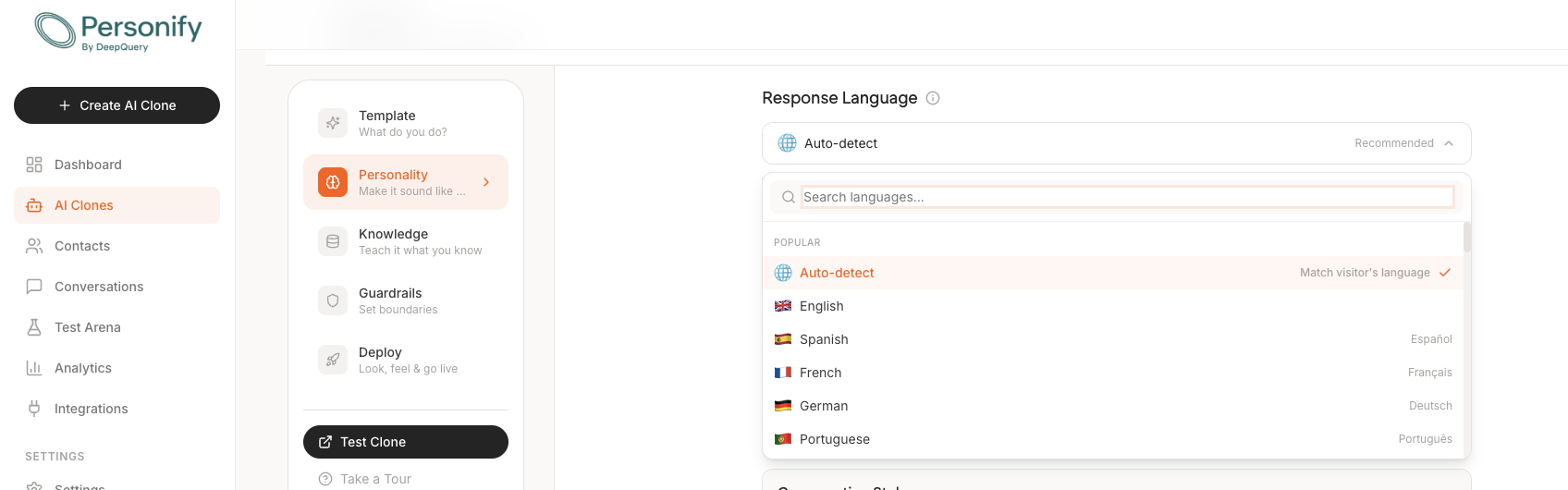
Open AI Clones
It is in the left sidebar. Pick the clone you want to change.
Go to Personality
Second step in the builder, the one described as make it sound like you. Response Language sits near the top.
Choose or search
Auto-detect is at the top and marked Recommended. Below it, twelve popular languages, then the rest. The search box is faster than scrolling once you know what you want.
Test it
Use Test Clone and send a message in the language you expect. Thirty seconds, and it is the only way to be sure it behaves the way you assumed.
Changing it later is fine. It is a setting on the clone rather than something fixed at training time, so a change applies to new conversations straight away with no rebuild.
Every Language You Can Pick
Over 100 are understood automatically. These 52 can be pinned by hand.
Worth being precise about the difference, because the two numbers describe different things. Auto-detect covers 100+ languages, including plenty that are not in this list. The list below is the set you can select explicitly when you want to force one language rather than match the visitor.
Popular
All languages
Not seeing yours in the list? Leave Auto-detect on. It handles far more than the pinnable set, and it will answer in a language that never appears in this dropdown.
Does It Still Sound Like You?
The question everyone asks second.
Mostly, and the reason is worth understanding. The clone is not translating a canned script. It is answering from your material, so what carries across a language boundary is your framework, your order of operations, the things you push back on. What is harder to carry is the texture: a turn of phrase, a joke that only works in English.
In practice that trade lands well, because the client asking in Portuguese was never going to get the English joke anyway. They wanted your answer, and they get it.
One boundary to be clear about: this is text. Voice cloning, where the clone speaks in your actual voice, comes with the Done-For-You service and is scoped on a call.
Frequently Asked Questions
How many languages does an AI clone speak?+
Over 100. With Auto-detect on, which is the default, the clone reads the language a visitor writes in and answers in that language, without you configuring anything. Separately there are 52 languages you can pin explicitly if you would rather the clone always answer in one specific language regardless of what the visitor writes.
Do I have to train my clone separately for each language?+
No. You train it once, on your own material, in whatever language your material is in. The language setting governs the language of the reply, not the knowledge behind it. A clone trained on English courses can answer a question asked in German, in German.
What is Auto-detect and why is it the recommended default?+
Auto-detect matches the visitor's language. Someone writing to your clone in Spanish gets Spanish back; someone writing in Japanese gets Japanese. It is recommended because it is almost always what you want on a public page or an embed, where you do not know in advance who is arriving or what language they will use.
When should I pin a specific language instead?+
Pin one when the audience is known and consistent. A German-language course, a cohort programme run entirely in Spanish, or a clone embedded behind a login for one national market. Pinning also keeps replies predictable when your own material is in a language other than the one your visitors write in.
Where do I change the response language?+
In the clone builder, under the Personality step. The setting is called Response Language and sits near the top of that step, with Auto-detect selected by default. Change it once and it applies to that clone everywhere it is deployed.
Can I change the language after the clone is live?+
Yes. It is a setting on the clone rather than something baked in at training time, so you can switch it at any point and the change applies to new conversations immediately. You do not need to retrain or rebuild anything.
One clone. Every client you have.
Train it once on your own frameworks and it answers in 100+ languages, matching whoever is asking, without a separate build for each market.
Free tier available. No credit card needed.